
Meghly Campaigns
Send to your customers. See who opened.
Build a list, write the email, check it before it goes out, and read the results as they come in. No code needed.
Free beta for 30 days. No card needed.
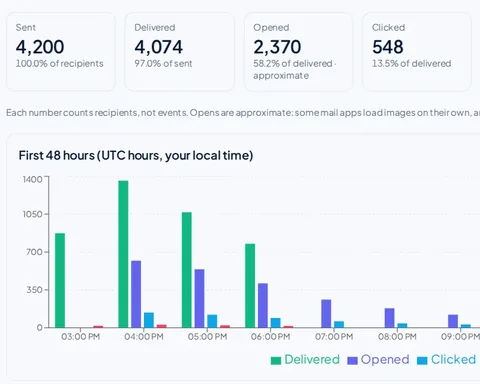
A sample report with demo data.
From a list to a report in six steps
01
Bring your contacts
Import a CSV of up to 50,000 rows, or collect sign-ups with a form. People who unsubscribed stay unsubscribed, even if you import them again.
02
Choose who gets it
Pick lists and saved segments, and leave out the lists you do not want.
03
Write the email
A subject, a preheader, HTML and a plain-text version. Columns from your CSV, like company or city, can be used in the text.
04
Check it first
A score from 0 to 100 and a list of what to fix: your domain's setup, the subject, the text, the links and the recipients.
05
Send now or schedule
Send within a minute or pick a time. You can unschedule before it starts.
06
Read the results
Sent, delivered, opened, clicked, bounced, complained and unsubscribed, with a CSV download.
What is in the box
Deliverability check
Scores your campaign before sending and says what to change.
Email verification
Check a list for bad addresses, disposable and role addresses and typos before you mail it. Uses credits.
Segments and tags
Send to people by a column, a tag, who opened or clicked lately, when they joined, or whether their address was verified.
Sign-up forms
A hosted form or an embed, inline or as a popup, with optional double opt-in.
A/B test on the subject
Two subject lines, split 50/50, with the results side by side in the report.
Welcome series
An automatic series of emails when someone joins a list. It stops if they unsubscribe.
Unsubscribe, always on
Every email carries a one-click unsubscribe, and people who leave, bounce or complain are not mailed again.
Careful sending
A new domain starts with small daily volumes and builds up. A campaign pauses itself if complaints or hard bounces get too high.
Your own domain
Send from news@yourdomain.com. Your mail can stay at Google Workspace or Microsoft 365: Meghly only has to be allowed to send.
API and AI assistants
Drive campaigns from your own code with an API key, or from an AI assistant through our MCP server.
Try a campaign without signing up
Build one, see the check and the report. Nothing is sent to anyone.
Built on Meghly Send
Campaigns uses the same delivery engine, suppression list and unsubscribe handling. If you send from your own app, use Meghly Send by API or SMTP.
Not included yet
We would rather tell you now.
- A visual drag-and-drop email editor. You write HTML and plain text.
- Automations with conditions and branches. Today there is a welcome series that runs in a line.
- A/B tests that pick the winner and send it to the rest on their own. You see the comparison and decide.
- Inbox-placement testing and sender-reputation scores. We do not offer them, and we do not claim to.
Questions
Do I need to know how to code?
No. Lists, campaigns and reports are all in the dashboard. You do need to paste a few DNS records for your domain once.
Can I send from my own domain?
Yes. Add your domain, publish the records shown (SPF, DKIM, DMARC) and press Verify. You do not need to move your mail.
Can people unsubscribe?
Yes, with one click, on every email. They are not mailed again.
Do you guarantee my email reaches the inbox?
No one can. We give you the check, the report and careful sending limits so you can see what is happening and fix problems early.
What is the difference from Meghly Send?
Campaigns is for sending newsletters and promotions from a dashboard. Meghly Send is for developers sending from their own apps by API or SMTP. They share the same delivery engine.
What does it cost?
Plans are on the pricing page. The beta is free for 30 days, with no card.